Guide on how to fill in information for student verification requests
1. Notes before proceeding
– Students must log in before proceeding. (Guide on how to retrieve login password)
– Request forms for various types of applications AT LINK
– Create a request (request form) AT LINK
– Processing time for requests is 2 to 3 working days, results of the request can be viewed AT LINK
– Duplicate requests and those not related to PCTSV will be automatically closed.
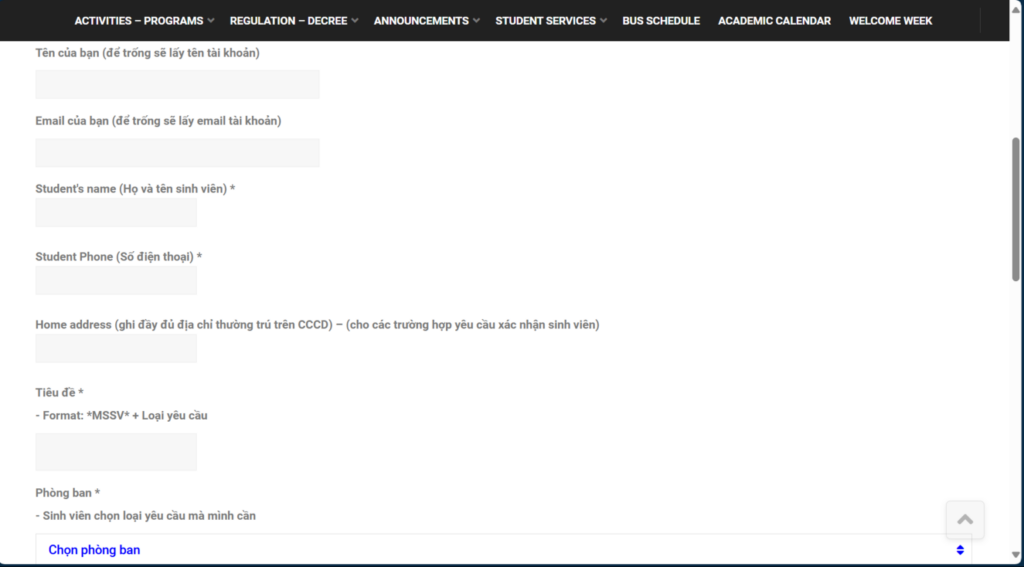
2. After logging in, students must fill in their information into the fields displayed on the request form (request form):
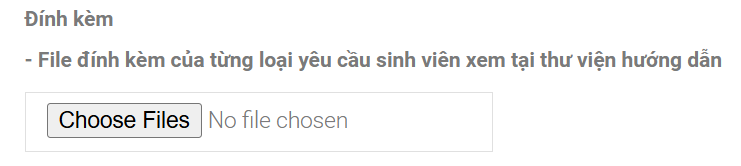
For student confirmations (e.g.: defer military service, bank loan, …), students must download and fill out all personal information into the student confirmation file, then upload it at the “Attachment” section (students download the student confirmation file they need at here).
3. Students select “Create Request”, then check the result and status of the request at here. Sinh viên do not click “Close Request”, if no request form is submitted, the request will be closed automatically by the system.
Format of information to fill in:
– File naming format: Student ID – Full Name – Type of Confirmation (Example: BABAIU22xxx – Nguyen Van A – Confirmation of Bank Loan)
– Format for entering date: add a leading zero before the day if it is less than 10, add a leading zero before the month if it is less than 3 (e.g., day 09 month 3 year 2024, day 09 month 02 year 2024)
– Method for entering academic year: write on the student ID card, usually the academic program lasts 4 years (e.g., 2021-2025)
– Method for writing Department/Program: Business Administration, Engineering and Industrial Management, Languages, Mathematics, Engineering and Construction Management…